
Key Fob vs Mobile Credentials vs Biometric Access Control (Costs, Pros/Cons, Best Uses)
Choosing the right access control system affects security, operational efficiency, and long-term costs. Plano businesses face multiple options: traditional key fobs, smartphone-based mobile credentials, and biometric readers. Each technology serves different needs based on staff size, turnover rates, multi-site operations, and audit trail requirements. Property managers and business owners need clear comparisons to make informed decisions.

This guide breaks down access control system cost Plano businesses can expect, along with practical pros and cons for key fob vs mobile access control and biometric systems. Understanding which door access control system fits your operation helps avoid expensive mistakes and ensures you get the security features you actually need.
Key Takeaways
Key fobs offer the lowest upfront cost but create ongoing replacement expenses with high turnover
Mobile credentials eliminate physical cards and provide remote management capabilities
Biometric access control delivers the strongest security and audit trails for sensitive areas
Total cost of ownership depends on staff size, turnover rates, and IT infrastructure
Combining technologies across different security zones often provides the best value
Table of Contents
Key Fob Access Control: Costs and Best Uses
Key fob systems remain the most common door access control system in Plano commercial properties. Proximity cards and fobs cost between $2 and $10 per credential, with readers ranging from $150 to $400 per door. Installation runs $500 to $1,500 per entry point depending on wiring requirements and integration complexity.
Pros:
Lowest upfront hardware costs
Simple user experience with no training required
Works reliably in environments with poor cellular coverage
Easy integration with existing access control panels
Cons:
Lost or stolen cards require immediate deactivation and replacement
No way to verify who actually used the credential
High turnover operations spend heavily on replacement cards
Cards can be shared between employees, creating security gaps
Key fobs work best for businesses with stable staff, moderate security needs, and limited IT infrastructure. Warehouses, small office buildings, and manufacturing facilities with low turnover often find key fobs sufficient. The technology proves cost-effective when employee counts stay consistent and audit requirements remain basic.
Mobile Credential Systems: Smartphone-Based Access
Mobile credentials turn employee smartphones into access devices using Bluetooth or NFC technology. Hardware costs run higher initially, with readers priced between $300 and $600 per door. However, elimination of physical cards reduces long-term expenses. Installation costs match key fob systems at $500 to $1,500 per door.
Pros:
Zero ongoing credential costs since phones replace cards
Remote provisioning and deactivation from anywhere
Employees rarely forget phones, reducing lockout calls
Enhanced audit trails showing exact entry times and locations
Instant access changes when employees transfer departments or locations
Cons:
Requires smartphones with compatible operating systems
Battery-dependent, though most systems include backup PIN codes
Higher upfront reader costs compared to proximity systems
IT policies may restrict personal device use in secure facilities
Biometric access control for business applications using mobile credentials fits companies with high turnover, multiple locations, or remote management needs. Tech companies, property management firms, and multi-site retail operations benefit most. Organizations with BYOD (bring your own device) policies find mobile credentials integrate smoothly with existing IT infrastructure.
Biometric Access Control: Fingerprint and Facial Recognition
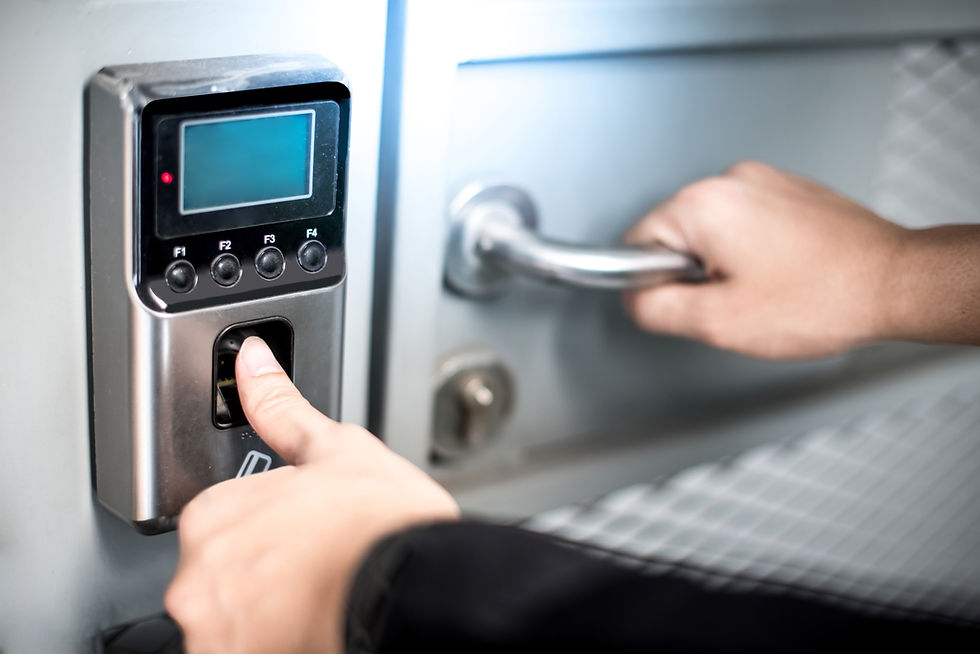
Biometric readers identify individuals based on unique physical characteristics. Fingerprint readers cost $400 to $1,200 per door, while facial recognition systems range from $800 to $2,500. Installation complexity adds $750 to $2,000 per entry point, especially for systems requiring network infrastructure and central databases.
Pros:
Impossible to share, lose, or forget credentials
Strongest audit trails linking specific individuals to access events
Eliminates credential replacement costs permanently
Works in environments where employees cannot carry cards or phones
Prevents "buddy punching" and unauthorized access
Cons:
Highest upfront investment per door
Privacy concerns require clear policies and employee consent
Environmental factors (dirty hands, gloves) can affect fingerprint accuracy
Slower throughput during shift changes compared to proximity cards
Database management requires IT resources
Biometric systems excel in high-security environments, healthcare facilities, data centers, research labs, and anywhere identity verification matters more than convenience. Organizations handling sensitive information or valuable assets justify the higher investment through eliminated credential fraud and superior investigations. Manufacturing facilities with employees wearing gloves often choose facial recognition over fingerprint readers.
Cost Comparison: Upfront and Ongoing Expenses
System Type | Reader Cost/Door | Credential Cost | 5-Year Total (50 employees, 10 doors) |
Key Fob | $200 - $400 | $5 each | $12,000 - $18,000 |
Mobile Credential | $400 - $600 | $0 (uses phones) | $14,000 - $20,000 |
Biometric | $600 - $1,500 | $0 (biological) | $16,000 - $28,000 |
These figures include hardware, installation, and typical replacement costs. High-turnover environments shift the calculation significantly. A business replacing 30 key cards annually at $5 each plus $50 programming fees spends $1,650 yearly on credentials alone. Over five years, that's $8,250 in avoidable expenses.
Mobile credentials eliminate replacement costs entirely, while biometric systems remove credential management from the equation. However, biometric systems require more substantial IT infrastructure and maintenance contracts.
Which System Fits Your Business?
Choose key fobs if:
You have fewer than 50 employees with low turnover
Budget constraints limit upfront investment
Basic access logs satisfy your audit requirements
Your facility lacks reliable cellular or network coverage
Choose mobile credentials if:
You manage multiple locations or remote sites
Staff turnover exceeds 20% annually
You need instant access changes across properties
Employees already carry smartphones for work
Choose biometric access control if:
You protect sensitive data, intellectual property, or high-value assets
Compliance requirements demand individual accountability
Shared credentials or "buddy punching" creates security risks
You operate in healthcare, research, or financial services
Many Plano businesses combine technologies strategically. Key fobs control perimeter doors and parking gates, mobile credentials manage office areas and conference rooms, and biometric readers secure server rooms and executive suites. This layered approach balances cost with security requirements across different zones.
Select the Right Access Control for Your Plano Business
Access control system cost Plano businesses pay depends on technology choices aligned with operational realities. Key fobs offer simplicity and low entry costs. Mobile credentials provide flexibility and eliminate card management. Biometric systems deliver unmatched security and accountability. The right choice depends on your staff size, turnover patterns, security requirements, and IT capabilities.
SAS Security has designed and installed access control systems for Plano and Fort Worth businesses since 1978. Our engineering team evaluates your specific needs and recommends solutions that balance security, usability, and total cost of ownership.
Contact SAS Security at 972.312.1700 to discuss access control options for your facility. We provide detailed assessments and custom system designs.
FAQs
What is the average cost of an access control system for a small business in Plano?
A basic 3-door key fob system typically costs $3,000 to $6,000 installed. Mobile credential systems run $4,500 to $8,000 for the same setup. Costs increase with door count, integration requirements, and chosen technology.
Can I upgrade from key fobs to mobile credentials later?
Yes, but it requires replacing readers at each door. Plan for this during initial installation by selecting control panels that support multiple credential types. Some systems allow mixed operations during transition periods.
How do biometric systems handle temporary contractors or visitors?
Most biometric access control systems include PIN code backup or temporary card options for short-term access. Visitor management systems can issue time-limited credentials that automatically expire.
Do mobile credential systems work without cell service?
Yes. Mobile credentials use Bluetooth or NFC, not cellular networks. The phone communicates directly with the door reader. However, provisioning new credentials or updating access rights requires network connectivity on the management system.
What happens if someone's fingerprint does not read consistently?
Quality biometric systems offer multiple enrollment options and alternative authentication methods. Facilities can use facial recognition as backup or assign PIN codes to individuals with fingerprint reading difficulties.
References
Security Industry Association (SIA). "Access Control Standards and Best Practices." SecurityIndustry.org.
National Institute of Standards and Technology (NIST). "Biometric Authentication Guidelines." NIST.gov.

Comments